

Use this free on-line guide to diagnose problems and make repairs around your home. Find parts and supplies too.
How To Guides Ask a Question Search Our Library Help Home Improvement


How To Test the Holding Switch

continued from page 3

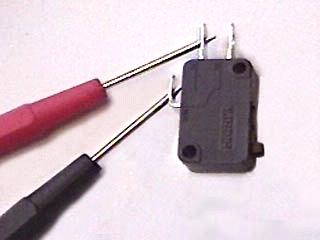
Test the switch for continuity using a multitester. Set the multitester to the ohms setting X1. Touch one probe to the side terminal and the other probe to the nearer terminal. The reading should be either infinity or zero. With the probes still in place, depress the switch. You should now get the opposite reading.

Test the holding switch

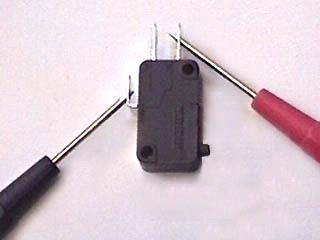
Leave the probe on the side terminal and move the other probe to the farther terminal. The test results should be the opposite of the results of the nearer terminal.

Test the other terminal of the holding switch

If the switch fails any of the tests, it should be replaced.

Click Here to Order a Multitester from Ace Hardware

page 4 of 4

Search by part number or model number for best results.
If you don't know your model number - try searching by appliance type, brand or part type.


Premium Service
Ask an Appliance Technician a Question!

JustAnswer.com


<<<GO BACK

Copyright © 2000 - 2009, Acme Parts.com, Inc. All rights reserved. Contact us to obtain licensing. Use of this site is subject to certain Terms of use which constitute a legal agreement between you and Acme Parts.com, Inc.