



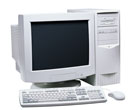

Overview of PC Memory Modules
The memory chips store information temporarily, for short term use. A PC's memory only contains information while the PC is on. When the PC is turned off, the information in the memory chips disappears. In some ways, the information in memory is similar to a thought you are having, it disappears when you start thinking about something else.
Caution: Please read our safety information before attempting any testing or repairs.
A PC's memory is an entirely different thing from the hard disk "memory". The hard disk stores information "permanently" for long term use. Hard disk "memory" (more accurately called storage) is like writing down information and storing it in a filing cabinet.
Memory chips are mounted in groups onto a memory module. The total of all the chips combined on that module is the memory capacity. Memory modules can be combined in a PC to increase the total memory capacity of the PC
Memory capacity is measured in megabytes (MB) or gigabytes (GB). In memory that predates SDRAM the speed was measured in nanoseconds (NS) and which measures the time it takes to access memory. Beginning with SDRAM the speed is the measurement of clock cycles and are measured in megahertz (MHz).
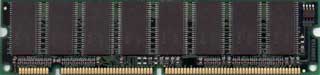
There are several types of memory, including FPM, EDO, SDRAM, RDRAM and DDR SDRAM. FPM, Fast Page Mode and EDO, Extended Data Output are extinct. Synchronized Dynamic Random Access Memory (SDRAM) is still available, but it isn't used in newer systems. Most PCs built in the past 2 years use DDR SDRAM. It uses a technology called "Double Data Rate" and so is known as DDR. DDR memory is available in three flavors DDR, DDR2 and the latest, DDR3. Each is incompatible with the other.
The size and shape of a memory module is called "form factor" and usually is either a SIMM or a DIMM (Single or Double In-line Memory Module). SIMMs come in 30 pin or 72 pin modules and DIMMs come in 168 pin modules. DDR memory have pin counts of 240, while SO-DIMM DDR for laptops has a pin count of 200.
The current minimum standard for memory in new PCs is 1GB and many PCs include 2GB. As the price for memory continues to drop, larger memory modules become more practical. If your PC has less than 1GB of RAM, and is able to support more, it is a virtual certainty that your PC performance would receive a boost from the addition of more memory.


