




How To Identify Pin One
Devices that connect through a cable have to be connected with the cable in the correct orientation. If the cable is reversed it can cause the device to malfunction or even damage the device.
Caution: Please read our safety information before attempting any testing or repairs.
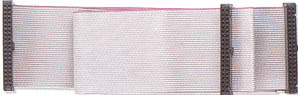
Ribbon cables, which are commonly used to connect hard drives, CD-ROM drives and floppy drives, typically are color coded to identify pin one. One edge of the ribbon cable will be marked in red or have some other identifying mark. Many ribbon cable connectors have a tab that aligns with a notch on the matching connector to guarantee proper alignment. However, this feature is not always reliable and so must visually confirm the correct alignment.
Finding pin one on the device itself can be a challenge. With good lighting and possibly a magnifying glass, you should be able to find the number one ("1") printed on the circuit board or connector.


