





How To Test the Door Switch
Continued from page 1
Test the switch for continuity using a multitester. Set the multitester to the ohms setting X1. Place a probe on each terminal. The multitester should change from a reading of infinity to zero when the probes touch the terminals. With the probes still touching the terminals depress the switch, the reading should change back to infinity. If it does not pass both of these tests, the switch should be replaced.
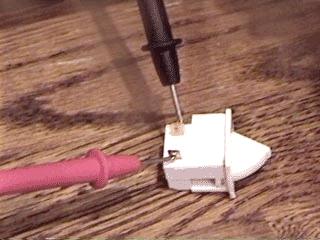
If there are four terminals, touch the probe to one terminal and then test each of the other three terminals with the other probe one at a time. Touching one of the three terminals should cause the multitester reading to change from infinity to zero. Those two terminals are a pair. Depress the switch with the probes still touching the terminals and the reading should change back to infinity. Now test the other two terminals. If either pair of terminals fails the continuity test, the switch should be replaced.
page 2 of 2


