

Use this free on-line guide to diagnose problems and make repairs around your home. Find parts and supplies too.
How To Guides Ask a Question Search Our Library Help Home Improvement

Repair Topics
Appliances
Cleaning
Door & Window
Electrical
Garden & Yard
Home Theater
Home Maintenance
HVAC
PC Repair
Pest Control
Plumbing
Main Menu
Twitter with us


NEW!

Sign up to receive our free Maintenance Reminder Newsletter

Learn More


How to Check the Compressor Motor

Continued from page 1

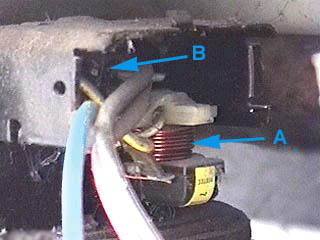
Beneath the terminal cover is found the compressor relay (labeled "A" below), overload protector (labeled "B") and the electrical terminals of the compressor motor.

(A) Relay (B) Overload protector

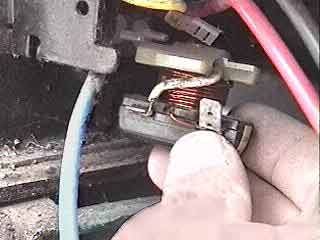
Remove the compressor relay by pulling it straight off from the compressor.

Pull the relay straight off from the overload protector

Pull the wire off of the side terminal of the relay. It is connected with a slip on connector. Firmly pull the connector, do not pull on the wire. You may need to use a pair of needle-nose pliers. Inspect the connector and terminal for corrosion. If either is corroded they should be cleaned or replaced.

page 2 of 3

Previous Page

Search by part number or model number for best results.
If you don't know your model number - try searching by appliance type, brand or part type.


Premium Service
Ask an Appliance Technician a Question!

JustAnswer.com


<<<GO BACK

Copyright © 2000 - 2010, Acme Parts.com, Inc. All rights reserved. Contact us to obtain licensing. Use of this site is subject to certain Terms of use which constitute a legal agreement between you and Acme Parts.com, Inc.